

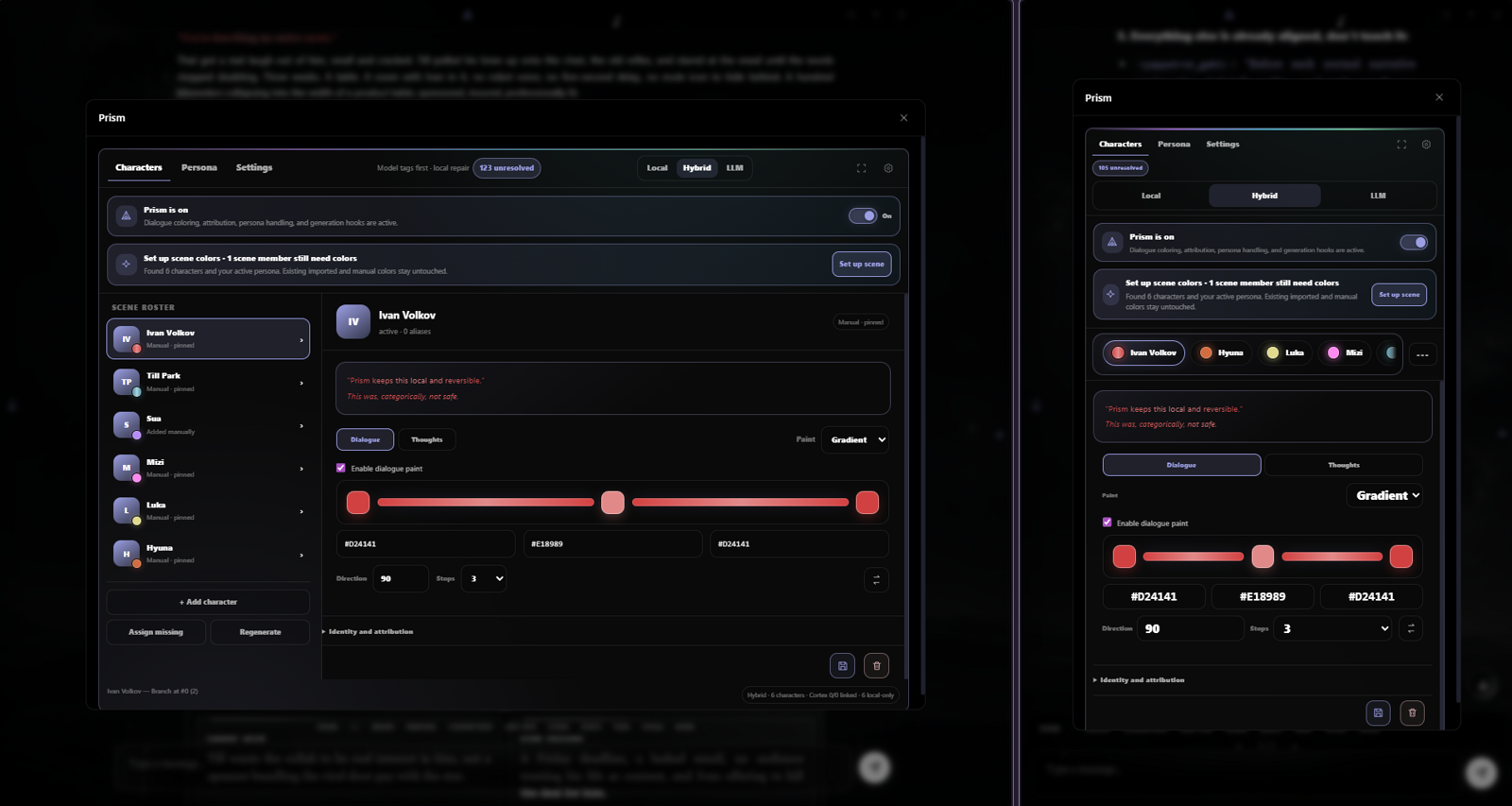
Compose reversible dialogue and thought paint over authoritative font tags, with Local, closed-loop Hybrid discovery, and LLM-assisted attribution.
About
Prism gives Lumiverse scenes deterministic, reversible dialogue and thought colors without making roleplayers type formatting tags. Hybrid is the default for new installs: it emits portable `` identity tags, rehydrates the finished response, and asks only whether genuinely new tagged speakers should enter the confirmed registry.
What it adds
4 additions
- 2
{{prismPrompt}}
{{prismHexes}}
- 1
Input bar action: Prism
- 1
Prompt interceptor
Version and source
1 detail · 1 link
Details
1.0.2.9
Links
Permissions
7 permissions
Granted on install
Read and change the Memory Cortex and long-term chat memory.
Read, add, change and hide chat messages.
Needs an admin to approve
Read, change and delete your chats.
Read, create, change and delete your characters.
Read, create, change, delete and switch your personas.
Master switch
Prism has a user-wide master switch at the top of the palette. Turning it off pauses prompt injection/macros, automatic persona coloring, DOM attribution/paint, Hybrid discovery, and post-generation hydration without deleting the saved registry, colors, or per-chat configuration. The disabled state persists across characters and chats until Prism is turned back on.
Existing persistent color tags already stored in message content are left untouched; the switch prevents Prism from adding or enhancing new runtime color behavior rather than destructively rewriting chat history.
Engines
Local — colors the rendered DOM only. Saved messages and model context are unchanged.
Hybrid — asks the model for portable canonical font tags, enhances those tags locally, fills confident untagged gaps, and asks only whether genuinely new tagged speakers should be registered, kept temporary, or ignored.
LLM — asks the model for canonical font tags and enhances those tags locally, without heuristic gap filling.
Existing engine choices survive migration. Hybrid is the default only for a fresh configuration.
Prompt delivery
Prism can deliver its live registry automatically or expose it to a preset:
Automatic appends the compiled Prism instruction through the generation interceptor.
Preset macro disables that automatic append. Place
{{prismPrompt}}wherever the full instruction belongs in the preset, or use{{prismHexes}}for only the current confirmed and provisional speaker-to-hex rows.
The Prompt settings include an autosaved custom instruction editor. Templates can use {{prismRegistry}}, {{prismHexes}}, {{prismProvisional}}, and {{prismPalette}}; Prism appends essential registry data when a custom template omits it.
More from the README
11 items
Everyday workflow
Open Prism from the chat toolbar.
Use Set up scene to import Cortex/transcript colors and generate collision-safe colors for anything missing.
Edit solid or two/three-stop gradient paint directly in the roster editor. The first dialogue stop is always the character’s canonical registry color.
In Local or Hybrid, right-click, long-press, or keyboard-open any detected segment to correct its speaker or content type. Enable Bake manual corrections under Cortex & attribution if those corrections should also be written into the stored message as portable font tags.
In Hybrid, click the yellow Awaiting review status only when Prism finds a clearly named, genuinely new tagged speaker. Register recurring characters, keep cameos temporary, or ignore them.
During generation, gradient text temporarily renders as its first canonical stop. Prism restores the full gradient only when the response completes or is cancelled, preventing streaming repaint flicker.
Persona behavior
The Persona tab separates two jobs that used to overlap:
Color persona messages automatically colors the active persona's user-role messages. Its enabled/disabled state is remembered as the default for new chats, and existing pre-1.0.2.7 chat state seeds that preference on migration.
Persona is part of the cast is chat-local and intended for impersonation / Speak for User workflows. It lets assistant-side dialogue resolve to the active persona, includes that persona in the assistant speaker registry, and exposes the persona as a manual recoloring target.
These switches are independent. Cast mode can therefore identify and color an impersonated persona in assistant output even when automatic coloring of user-role messages is disabled.
Existing formatting
Portable ``, escaped legacy tags, BBCode colors, and explicit inline colors are protected. Prism may use a uniquely matched tag as speaker evidence and may apply a reversible local solid/gradient overlay, but ordinary rendering does not destructively rewrite saved markup.
Bake manual corrections is the explicit exception: when enabled in Local or Hybrid, a manual speaker correction writes the canonical speaker color into the active stored swipe. Prism recolors an exact existing font tag when possible or wraps only the corrected segment when markup was missing. Each successful bake creates a transcript recovery backup first.
Lumi theme colors applied as presentation are not treated as legacy speaker evidence.
The rendering trust order is:
Manual correction.
Confirmed tag consistent with explicit prose.
Explicit speaker label or reporting clause.
Confirmed tag without contradictory prose.
Tentative observed tag.
Paragraph/action continuity.
Bubble ownership and carefully seeded alternation.
Unresolved, teachable text.