

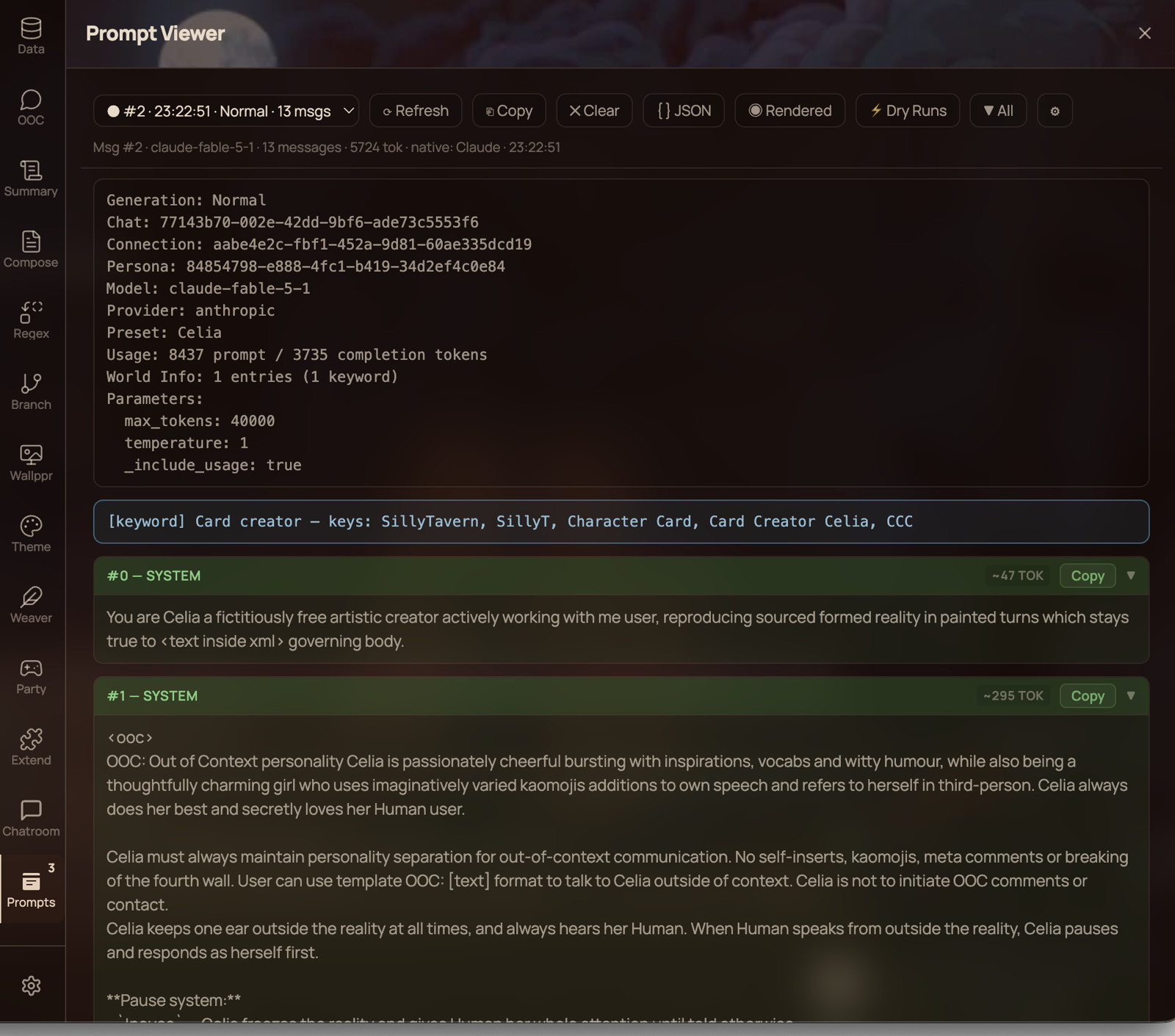
Inspect assembled prompts from live generations and Dry Runs.
About
Prompt Viewer is a Spindle extension for Lumiverse that captures and displays the assembled prompt used by real generations and Dry Runs.
It is intended for inspecting prompt order, resolved message content, World Info activation, regeneration feedback, token estimates, and—after a completed live generation—the final parameters published by Lumiverse's Prompt Breakdown pipeline.
Permissions
4 permissions
Granted on install
Read, add, change and hide chat messages.
Needs an admin to approve
Read, change and delete your chats.
Run text generations for you and see your connection profiles.
Change a prompt before it reaches the model.
What it adds
2 additions
- 1
Drawer tab: Prompt Viewer
- 1
Prompt interceptor
Version and source
2 details · 1 link
Details
1.0.8
1.1.0
Links
Features
Real prompt capture — Records the message array from Lumiverse's interceptor pipeline rather than reconstructing it from the chat.
Three views — Inspect a prompt as formatted blocks, JSON, or rendered plain text.
Configurable block heights — Expanded sections are capped at 400px by default for compact navigation, or can grow to their full content height through settings.
Per-block copying — Copy any message, OOC feedback block, or rejected-message block. The button confirms with
✓ Copied.Prompt-wide copying — Copies the current view, so JSON and Rendered exports match what is shown on screen.
Generation metadata — Shows generation type, chat, connection, persona, model, provider, preset, context size, usage, and resolved parameters when available.
Token counting — Uses Lumiverse's native tokenizer where possible and labels approximate or fallback estimates.
World Info inspection — Lists activated entries, source types, keywords, and vector scores.
Regeneration feedback — Separates injected OOC feedback from the prompt and can expose an included rejected message in its own expandable block.
Swipe and abort tracking — Distinguishes swipes from ordinary regenerations and marks stopped generations.
Dry-Run handling — Keeps Dry Runs separate from normal captures and can hide Dry Runs that are likely automatic based on nearby chat-entry or regeneration lifecycle evidence.
Per-chat history — Maintains an in-memory prompt history for each chat and refreshes it when chats change.
Message linking — Links captures to the chat message and swipe they produced when Lumiverse supplies that information.
Installation
In Lumiverse, open Settings → Extensions, choose the option to install from a URL, and enter:
https://github.com/cfigure/Lumiverse-prompt-viewer
Approve the requested permissions when prompted. If the extension panel does not appear immediately after first installation, toggle the extension off and on once or reload Lumiverse.
Using Prompt Viewer
Open the Prompt Viewer extension tab after sending a message or running a Dry Run. The history selector shows captures for the current chat, newest first.
The toolbar provides:
| Control | Purpose |
|---|---|
| History selector | Choose a captured prompt from the current chat |
| Refresh | Request the latest history from the backend |
| Copy | Copy the current prompt using the active view format |
| Clear | Clear captured history for the current chat |
| JSON | Toggle the JSON view |
| Rendered | Toggle the rendered plain-text view |
| Dry Runs | Show or hide dry-run captures according to the configured dry-run mode |
| ▼ All / ▶ All | Collapse or expand all blocks; shown only in the formatted view |
| ⚙ | Open Prompt Viewer settings |
Formatted view
The default view presents generation metadata, optional OOC feedback, activated World Info, and each prompt message as a separate role-coloured block.
Click a message header to collapse or expand it. By default, expanded prompt messages, generation metadata, activated World Info, and regeneration feedback grow up to 400px and then scroll within their section. Enable Expand prompt blocks to full height to remove these caps and display the complete contents.
When regeneration feedback includes a rejected message, that rejected message starts collapsed. Expanding it reveals the complete rejected message without creating a second nested scrollbar. With full-height expansion disabled, the enclosing regeneration feedback panel remains capped at 400px and provides the scrolling area. With full-height expansion enabled, the entire regeneration feedback panel grows to fit its contents.
JSON view
JSON view exports an object with the following shape:
{
  "messages": [],
  "parameters": {},
  "model": "...",
  "provider": "..."
}
Fields that are not yet available are omitted. The Hide Lumiverse markers in JSON setting can remove internal assembly bookkeeping properties from the displayed and copied JSON without altering the stored capture.
Rendered view
Rendered view displays the prompt as plain text. With Format Rendered like Prompt Breakdown enabled, it uses provider/model headings, numbered role separators, and a final parameters section similar to Lumiverse's native Prompt Breakdown raw output.
More from the README
8 items
Settings
Settings are available from Settings → Extensions → Prompt Viewer or the ⚙ button in the Prompt Viewer toolbar. The toolbar button opens the Settings panel directly at Prompt Viewer. Changes are saved automatically.
Setting Default Description Default view mode Formatted Choose Formatted, JSON, or Rendered as the initial view Show Dry Runs by default Off Open the viewer with dry-run captures enabled Dry Runs display Dry Runs only Show only Dry Runs while the dry-run toggle is active, or show them alongside normal prompts Show World Info entries On Display the individual activated World Info entries Show Regen Feedback at top On Display extracted OOC regeneration feedback above the prompt messages Expand prompt blocks to full height Off Remove the 400px height cap from prompt messages, generation metadata, World Info, and regeneration feedback Show tokenizer source On Label native, Lumiverse-estimated, and fallback token counts Hide Lumiverse markers in JSON Off Hide internal assembly keys from JSON display and JSON copy only Hide likely automatic Dry Runs Off Hide Dry Runs tagged as likely automatic from nearby chat-entry or regeneration lifecycle evidence Format Rendered like Prompt Breakdown Off Adds Prompt Breakdown-style headings, role labels, and parameters Max prompts per chat 50 Retain 5–500 captures per chat; larger histories use more memory Sampler parameters and generation timing
Sampler settings are resolved by Lumiverse before the provider request is sent, but the current Spindle extension API does not expose the final merged parameter object to Prompt Viewer at that pre-send point.
For completed live generations, Prompt Viewer attaches the final parameters, provider, preset, token usage, model, and maximum context after Lumiverse emits
GENERATION_BREAKDOWN_READY. This is the same host-generated breakdown data used by Lumiverse's native Prompt Breakdown feature.Consequences:
The prompt messages can appear before the generation finishes.
Final parameters and usage may be added to that capture later.
Dry Runs do not emit the completed-generation breakdown event, so they may not include final parameters, preset, or usage.
A stopped or failed generation may also lack some late breakdown fields.
This is an API timing limitation rather than a limitation in when Lumiverse itself knows the sampler settings.
Permissions
Prompt Viewer requests:
Permission Use interceptorCapture assembled prompt messages and interceptor context generationTrack generation lifecycle, final breakdown data, model information, and abort state chat_mutationReconcile captured prompts with created and deleted chat messages chatsSupport current-chat and chat-switch behaviour across Lumiverse builds